
IBM SPSS Statistics 31
統計分析の新機能と機能強化を実現
- Windows 11対応
- macOS Tahoe 26.0 対応
- 初年度12か月保守付き
- ダウンロード/DVD
SPSS v31の新機能
IBM SPSS Statistics v31では、多変量データの可視化や時系列分析、機械学習など、幅広い分野で活用できる新機能が追加されました。また、ユーザーインターフェースの改善や技術的な強化も行われています。
近接マッピング
多変量データの次元削減と可視化
分析 > マッピング > 近接マッピング
多変量データの次元削減と、オブジェクト(ケース、項目、その他のエンティティ)間の関係を空間配置で表示する可視化技術です。複数の近接性ソース、追加変数(属性とプロパティ)をサポートし、幅広い変換と制限オプションを提供します。
近接マッピングの詳細を見る/IBMサイトProximity mapping is a visualization technique that is used to reduce the dimensionality of multivariate data and to display relationships among objects (cases, items, or other entities) in a spatial configuration. It supports multiple proximity sources, incorporates additional variables (attributes and properties), and offers a wide range of transformation and restriction options. These features make PROXMAP a powerful tool for exploring multivariate structure and integrating diverse types of data into a unified spatial representation.
距離相関
非線形な依存関係の検出
分析 > 相関 > 距離相関
変数間の統計的依存関係(線形・非線形問わず)を検出する多用途メトリックです。非線形で複雑な依存関係を示すリアルワールドデータの分析制限に対処します。
距離相関の詳細を見る/IBMサイトDistance Correlation is a versatile metric that detects any form of statistical dependence between variables (linear or nonlinear). It addresses the limitations of analyzing real-world data that often exhibits nonlinear and complex dependencies.
時系列フィルタリング
時系列のトレンドと循環成分の分解
分析 > 時系列 > 時系列フィルター
計量経済学と時系列分析の重要な技術で、時系列をトレンド成分と循環成分に分解するために使用されます。マクロ経済学と金融において、景気循環変動や長期経済トレンドの特定に不可欠です。Pythonプラグインを使用した拡張手続きとして追加され、拡張ハブから「Time Series Filters」を検索・インストールできます。
時系列フィルタリングの詳細を見る/IBMサイトTime series filtering is a vital technique in econometrics and time series analysis, often employed to decompose a time series into trend and cyclical components. This is especially important in macroeconomics and finance, where identifying business-cycle fluctuations or long-term economic trends is essential. Time Series Filters (TSF) is added as an extension procedure with Python plug-in. Search and install the extension Time Series Filters from extension hub (Extensions > Extension hub).
条件付き推論木
安定した分類・回帰木の推定
分析 > 分類 > 条件推論ツリー
条件付き推論または順列検定の統一フレームワークを使用して、分類・回帰木を推定します。過学習の可能性を低減したより安定した木を提供します。Rプラグインを使用した拡張手続きとして追加され、拡張ハブから「Conditional Inference Tree」を検索・インストールできます。
The Conditional Inference Tree procedure estimates classification and regression trees, by using a unified framework for conditional inference or permutation tests. It provides more stable trees with reduced chances of overfitting. The two types of trees that are provided by this procedure are conditional inference trees and model-based trees. Conditional Inference Tree is added as an extension procedure with R plug-in. Search and install the extension Conditional Inference Tree from extension hub (Extensions > Extension hub).
STATS EARTH
非線形性と交互作用の検出
分析 > 一般線型モデル > 多重適応回帰スプライン
MARS(Multiple Adaptive Regression Splines:多重適応回帰スプライン)アルゴリズムを使用して回帰分析を実行し、非線形性と交互作用を検出します。Rプラグインを使用した拡張手続きとして追加され、拡張ハブから「Multiple Adaptive Regression Splines」を検索・インストールできます。
STATS EARTH uses the MARS algorithm to perform regression analysis to detect nonlinearities and interactions. This is added as an extension procedure with R plug-in. Search and install the extension Multiple Adaptive Regression Splines from extension hub (Extensions > Extension hub).
キュレーテッドヘルプ
分析結果の自動要約
相関係数 / 偏相関係数 / 距離 / 正準相関 / 線形回帰の相関係数
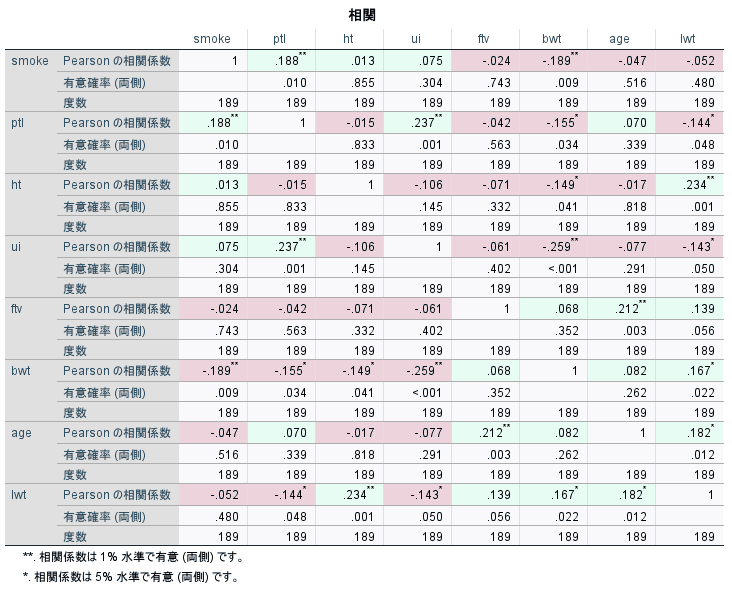
手続きの出力を分析し、主要な発見事項の要約を提供する機能です。強調したい値を色分けして表示させることができます。IBM SPSS Statistics 31では、相関係数、偏相関係数、距離、正準相関、線形回帰における相関係数で利用できます。
Curated Help is a feature that analyzes the output of a procedure and provides a summary of key findings. For IBM SPSS Statistics 31, Curated Help is available for the following procedures. Bivariate Correlations (Analyze > Correlate > Bivariate), Partial Correlation (Analyze > Correlate > Partial), Distances (Analyze > Correlate > Distances), Canonical Correlation (Analyze > Correlate > Canonical Correlation), Correlation in Linear Regression (Analyze > Regression > Linear)
統計分析機能の改善
機能強化
検定オプションの拡充で、分析の自由度が向上
これまで、クロス集計表のメニューで実行していた独立性のカイ二乗検定を単独で実行できるようになりました。また、独立したサンプルのt検定では従来は自動的に実行されていた等分散性検定の実行有無を選択できるようになりました。また、複数の手続きで変動係数(Coefficient of Variation, CV)の計算オプションが実装され、より詳細な統計分析が可能になりました。
The Analyze menu now includes a direct option for Chi Square test of independence, and Independent-Samples T-Test features an optional control for homogeneity of variance testing. Additionally, coefficient of variation calculation has been implemented across multiple procedures, enabling more detailed statistical analysis.
ユーザーインターフェースの改善
機能強化
ダークモード対応とExcelインポートの強化
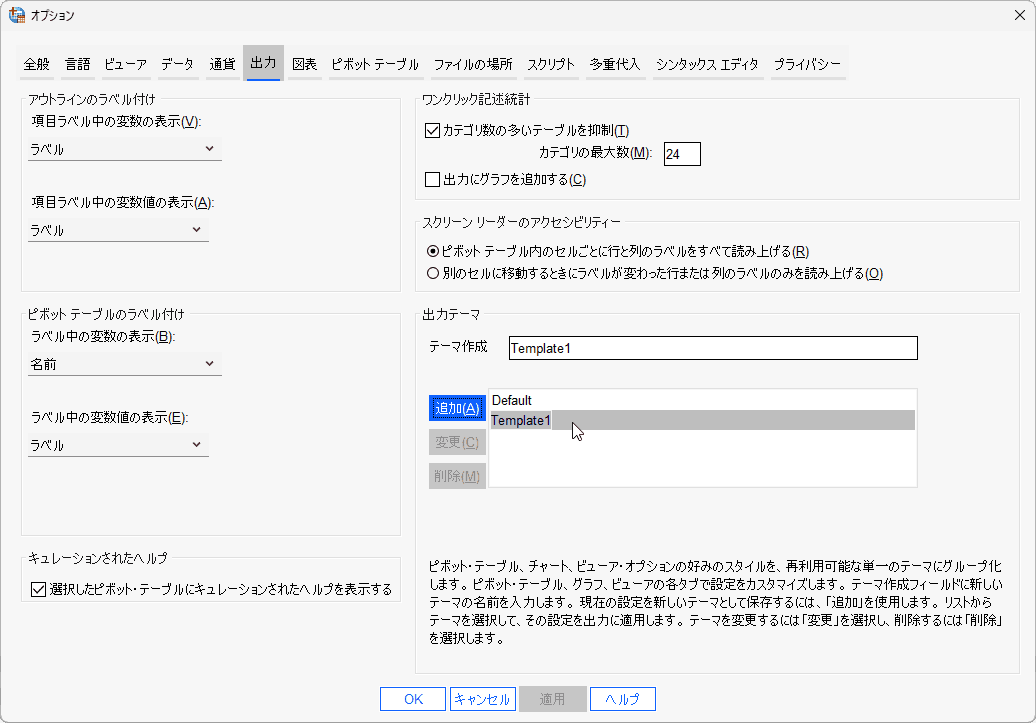
テーブルヘッダー、ツールバーアイコン、チャート、出力ビューアーがダークモードに対応し、より快適な作業環境を提供します。Excelインポートでは変数名を最初の行から読み取るオプションが追加され、出力テーマの作成機能により、ピボットテーブルやチャートの好みのスタイルを保存・再利用できるようになりました。また、チャートに背景画像を設定できる機能も追加されています。
Dark mode support has been extended to table headers, toolbar icons, charts, and the Output Viewer, providing a more comfortable working environment. Excel import now offers the option to read variable names from the first row, and the new output theme creation feature allows users to save and reuse preferred styles for pivot tables and charts. The ability to set background images in charts has also been added.
ユーザービリティの向上
機能強化
検索機能とメニュー表示の改善
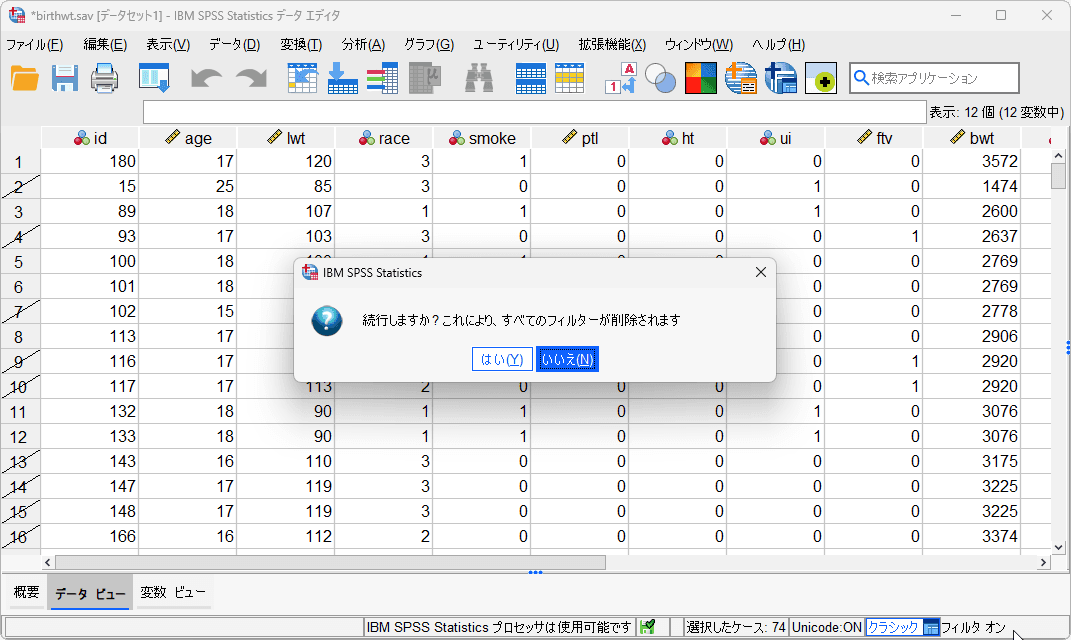
アプリケーション検索バーから直接実験計画法関連手続きを検索できるようになり、ライセンスされていない機能もメニューに表示され、アップグレードガイダンスが提供されます。変数ビューでのデフォルト列幅設定や、フィルター設定時の選択ケース数表示など、日常的な操作の効率化が図られています。
Users can now directly search for Design of Experiments procedures from the application search bar, and unlicensed features are displayed in the menu with upgrade guidance. Daily operations have been streamlined with features such as default column width settings in Variable View and the display of selected case counts when filters are applied.
技術的改善
機能強化
Python・JRE/JDKのアップグレードとCognos連携
Pythonを3.13.1に、Java Runtime Environment (JRE)とJDKを17.0.13.0にアップグレードし、新しい中国語文字標準(GB18030-2022)に対応しました。さらに、Cognos AnalyticsからIBM SPSS Statisticsへのデータインポートが可能になり、より柔軟なデータ分析環境を実現しています。
Python has been upgraded to version 3.13.1, while Java Runtime Environment (JRE) and JDK have been updated to 17.0.13.0. Support for the new Chinese character standard (GB18030-2022) has been added. Furthermore, data import from Cognos Analytics to IBM SPSS Statistics is now possible, creating a more flexible data analysis environment.
Boruta Feature Selection
変数の重要度による特徴選択
分析 > 記述統計 > Boruta Feature Selection
Boruta Feature Selectionは、元の変数の重要度をシャドウ属性(元の変数のケース値をシャッフルして作成)と比較して特徴選択を行います。重要度の低い変数は削除され、重要な変数は確認され、残りは解決されるまで暫定的にマークされます。Rプラグインを使用した拡張手続きとして追加され、拡張ハブから「STATS_BORUTAFEATURES」を検索・インストールできます。
Boruta Feature Selection compares the importance of original variables with shadow attributes that are created by shuffling case values of original variables. Variables less important are removed, more important ones are confirmed, and the rest are marked tentative until resolved. This is added as an extension procedure with R plug-in. Search and install the extension STATS_BORUTAFEATURES from extension hub (Extensions > Extension hub).
t検定のキューレッドヘルプ
動的な結果解釈
1標本t検定 / 独立したサンプルのt検定 / 対応のあるサンプルのt検定
キューレッドヘルプの機能が、相関係数、偏相関係数、距離、正準相関、線形回帰における相関係数に加えて、t検定の手順でも利用が可能になりました。1標本t検定、独立したサンプルのt検定、対応のあるサンプルのt検定に対応し、分析結果の理解を深めるためのガイダンス機能として活用できます。
Curated Help is available for T-Test procedures and provides dynamic interpretations of results. Curated Help is available for the following T-Test procedures: One Sample T-Test, Independent Samples T-Test, and Paired Samples T-Test.
AI Output Assistant
AIを活用した出力の説明機能
IBM watsonx.ai
AI Output Assistantでは、出力を選択して大規模言語モデル(LLM)に質問し、出力に関連する説明を得ることができます。この機能はIBM watsonx.aiによって提供されます。出力ビューアのメニューバーから「Analyze output with AI tools」をクリックするか、出力ビューアを右クリックして「AI Output Assistant」を選択してアクセスできます。本機能のご利用には、IBMクラウドおよびWatsonxのトライアルまたは有料アカウント、クレジットカード情報が必要です。
With the AI Output Assistant, you can select output and ask questions to Large Language models (LLMs) and get explanations related to the output. The feature is powered by IBM watsonx.ai. You should have a trial or paid account in IBM watsonx to use the feature. Go to the menu bar in output viewer and click Analyze output with AI tools to open the AI Output Assistant.
AIアシスタントは出力結果の解釈支援のためのものであり統計分析についてのエージェント機能などは含みません。選択可能なモデルに、GPTやClaudeなどは含まれません。詳細な支援を必要とする場合は、IBM社のテクニカルサポートにお問合せをお願い致します。
選択可能なモデルは以下の通りです:
ibm/granite-3-2-8b-instruct, ibm/granite-3-8b-instruct, ibm/granite-vision-3-2-2b, meta-llama/llama-3-1-70b-gptq, meta-llama/llama-3-2-11b-vision-instruct, meta-llama/llama-3-2-90b-vision-instruct, meta-llama/llama-3-3-70b-instruct, meta-llama/llama-3-405b-instruct, meta-llama/llama-4-maverick-17b-128e-instruct-fp8, mistralai/mistral-large, mistralai/mistral-medium-2505, mistralai/mistral-small-3-1-24b-instruct-2503, mistralai/pixtral-12b, openai/gpt-oss-120b
構文エディタのショートカットキー
機能強化
構文エラーの確認
構文エディタに以下の新しいショートカットキーが追加されました。
- 次のエラーに移動:
Ctrl+E(Win/Linux) /Command+E(macOS) - 前のエラーに移動:
Ctrl+Shift+E(Win/Linux) /Command+Shift+E(macOS)
これらのショートカットにより、構文エラーの確認と修正がより効率的に行えるようになります。
The following new shortcut keys are added in Syntax Editor: Go to next error (Ctrl+E / Command+E) and Go to previous error (Ctrl+Shift+E / Command+Shift+E). These shortcuts make it more efficient to check and fix syntax errors.
JRE/JDKアップグレード
機能強化
Javaベースの機能の安定性とパフォーマンスの向上
Java Runtime Environment (JRE) と Java Development Kit (JDK) が17.0.16にアップグレードされました。これにより、Javaベースの機能の安定性とパフォーマンスが向上し、最新のJavaセキュリティ機能を活用できるようになります。
JRE and JDK are upgraded to version 17.0.16. This improves the stability and performance of Java-based features and enables the use of the latest Java security features.
価格について
このバージョンアップによるSPSSライセンス価格に変更はございません。2026年1月21日以降の新規購入は最新バージョン「31.0.2」での納品となる予定です。 詳細は、WEBお見積りフォームよりお気軽にお問合せください。
macOSの動作環境について
Tahoe 26.0に対応しています。詳細は、IBM Software Product Compatibility Reportsでご確認ください。
バージョンアップについて
IBM SPSS Statistics をご購入済みで、PA(パスポート・アドバンテージ)による保守サービスが有効なお客様は、 追加の費用をご負担いただくことなく無料でv31.0.2にアップグレードできます。ダウンロード方法が分かりにくい、 ダウンロードに時間がかかるなどお困りのお客様は弊社担当営業にご相談ください。なお、バージョンアップ等の サポート対応は、弊社よりSPSSをご購入のお客様に限らせていただいております。保守なしの場合はお手数でも 購入元の販売代理店様にお問合せくださいますようお願い致します。
IBM、IBM logo、ibm.com は、International Business Machines Corporation の米国およびその他の国における商標です。
SPSS導入のご相談はお気軽に
製品やサービスに関するご相談はお気軽にお問合せください。
電話でのお問合せ
047-711-0427受付時間: 平日 9:00-18:00
WEBフォーム
見積を依頼する原則として1営業日以内にご返信します
emailで問合せ
info@stats-guild.com
原則として1営業日以内にご返信します